Dev drawer and Copy as cURL
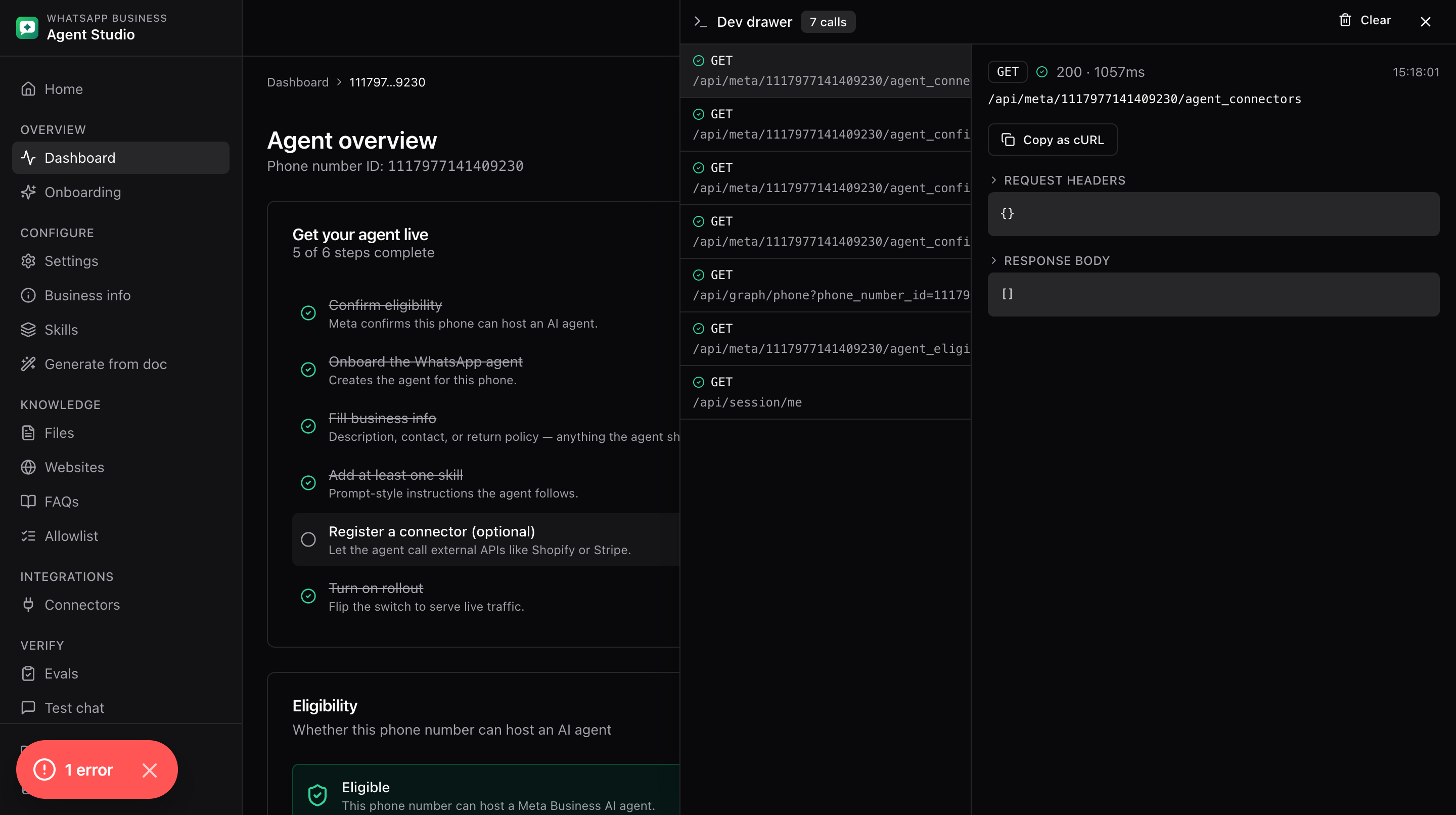
The dev drawer shows the last several API calls the app has made and lets you copy any of them as a runnable cURL command. Handy when a screen doesn't behave, or when you want to reproduce a call outside the app.
What you'll do
- Open the dev drawer.
- Inspect a call's request and response.
- Copy any call as cURL.
Open the drawer
Three ways:
- Open the Settings dropdown in the top-right of the header and toggle Dev drawer. A check mark appears next to it while the drawer is open.
- Press
Cmd+Shift+Don macOS orCtrl+Shift+Don Windows/Linux. - Add
?debug=1to any URL.
What's inside
- A list of the most recent calls, each showing method, URL, status, and duration.
- Click a call to see the detail pane:
- Request method, URL, and headers.
- Request body.
- Response status, headers, and body.
- Timestamp.
- A Copy as cURL button.
Copy as cURL
Click Copy as cURL on any call. The command is copied to your clipboard, ready to paste into a terminal.
For your safety, the copied command intentionally leaves out the session cookie. This means the copied command will not authenticate as you; if you need to reproduce authenticated behavior, use your own access token directly against the Meta API.
Good to know
- The buffer keeps the last several calls and is not persisted. Refreshing the page clears it.
- Only calls that go through the app's shared network layer show up here. Truly ad-hoc requests you make in the browser dev tools console will not.
Troubleshooting
- The keyboard shortcut does nothing, click on the page first so it has focus, then try again.
- A call you expected is missing, some calls (like some background health checks) may be filtered out. Interact with the page and check again.
- The copied cURL fails with an authentication error, that is expected. The command has no cookie by design. Reproduce the call with your own access token if needed.